
MySQL is an open-source Relational Database Management System that uses SQL to create and manage databases. As a relational database, MySQL stores data in tables of rows and columns, organized into schemas.
Our MySQL Connectors allow you to push and pull data from a MySQL database.
Note:
- MySQL connections are available exclusively to Premium account holders. The user must have Administrator-level access to view and configure the MySQL connection option.
- The default port for MySQL is 3306. Ensure this port is open in your firewall and configured to accept incoming connections from Forms On Fire cloud servers.
- Get a list of our platform’s cloud IP addresses.
Adding a MySQL Connection
Navigate to the Side Menu → Connected Data → Connections to add a MySQL Connection.
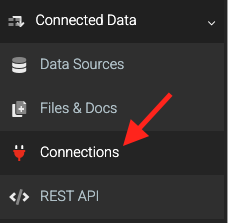
More information on adding a connection: Adding Data Connections.
On the Connections page:
- Click the ADD CONNECTION button on the top right to open the list of connections.
- Choose the MySQL option
Authenticating
Once the connection is added, fill in the required properties and save

Connection String
Add the MySQL Connection String to be used by connectors to access your database. You must include Server, Database, User ID, and Password credentials in the string.The MySQL user specified must have at least CREATE, DELETE, ALTER, INSERT, and SELECT privileges assigned. For the most direct configuration, grant all privileges to the user.
Click the SAVE button on the top right to store your configuration and automatically verify the connection.
Troubleshooting Tips
To assist you in establishing your MySQL connection, below are common errors that you might encounter, and recommended solutions.
TLS Version Error
If your MySQL connection fails with the error message:
A connection was successfully established with the server, but then an error occurred during the login process. (provide: SSL Provider; error: 0 – An existing connection was forcibly closed by the remote host)
This suggests your MySQL server does not support TLS 1.2.All communications between our platform and external servers require support for the TLS 1.2 security protocol (minimum).
An upgrade enabling TLS 1.2 or higher may be necessary. Please work with your IT team to implement this.
Check if your database server is configured for TLS 1.2 or higher